Steam Market tools that respect your data.
Your transactions stay on your machine. No server, no analytics, no account — everything runs in your browser.
Each does one thing well.
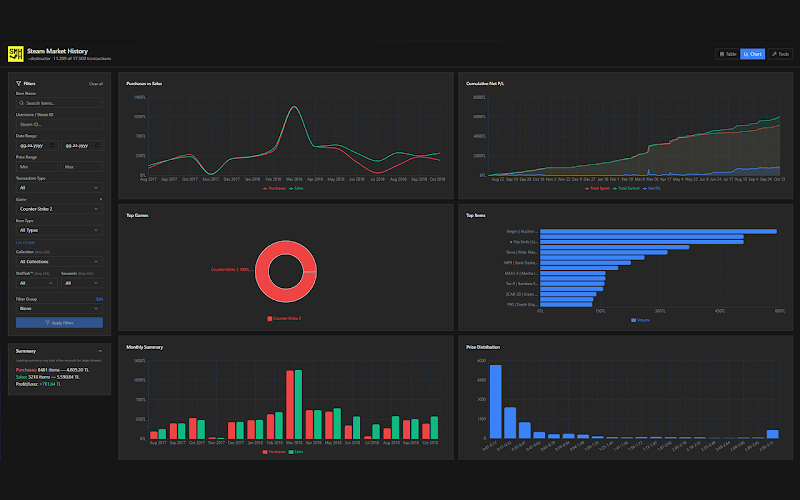
Steam Market History Helper
Your entire market history, in a SQLite database in your browser.
- + Store 1M+ transactions in local SQLite
- + 12 interactive profit/loss charts
- + 15+ filters · CSV/JSON export
- + Multi-account · 1.5GB+ backups
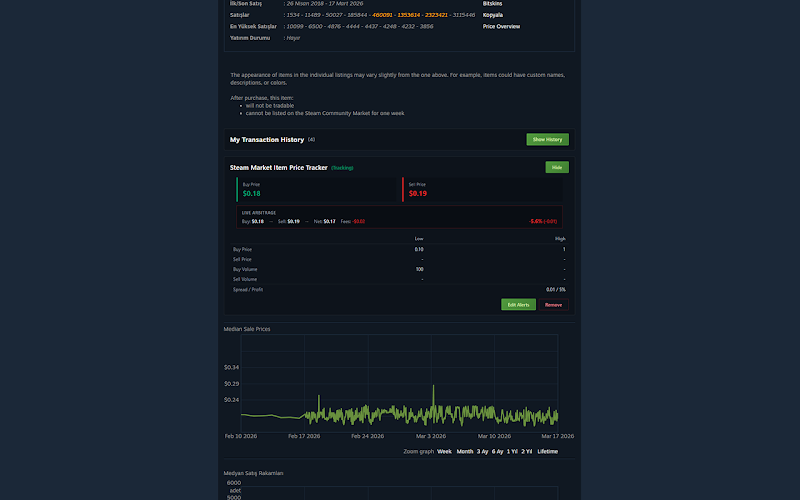
Steam Market Item Price Tracker
Get alerted when a price hits your target — with a commission breakdown.
- + Price targets with 6 alarm types
- + Live arbitrage calculator
- + Net profit with commission breakdown
- + Desktop notifications
From install to first result, step by step.
Most issues are solved in the first few steps. Pick an extension:
Install the extension
"Add to Chrome" from the Chrome Web Store. No account or sign-up needed.
Log into Steam
The extension detects your Steam session automatically and starts syncing in the background — no page to open.
Let it sync
Your full history (1M+ transactions) is fetched in the background via your Steam session (every ~10s by default) and written to in-browser SQLite; a progress panel shows status.
Open the dashboard and analyze
Explore 12 charts and 15+ filters; export to CSV/JSON whenever you like.
Install the extension
"Add to Chrome" and approve the permissions.
Open an item, click the tracker icon
Open the tracker on any market item page.
Set a target price + alarm type
Choose one of 6 alarm types and set your threshold.
Get notified, see arbitrage
When the target hits you get a desktop notification and a live arbitrage calculation.
Frequently asked questions
+ I installed it but my history isn't showing.
Just make sure you're logged into Steam. The extension detects your session and starts syncing your market history in the background automatically — you don't need to open any specific page. Check progress or pause/resume from the extension popup.
+ Where does my data go?
Nowhere. Everything is stored inside your browser (in-browser SQLite / IndexedDB). There is no server to send it to.
+ Can I back up my data?
Yes. Export your transactions as CSV or JSON, with full backups of 1.5GB+.
+ Can I use multiple Steam accounts?
Yes, multi-account is supported and each account's history is kept separate.
+ Notifications aren't working.
Enable Chrome notification permission for the extension. Once allowed, price alarms arrive as desktop notifications.
“I don't even have a server to send your data to.”
Privacy isn't a feature — it's the identity of this project. No server, no analytics, no telemetry, no account. The extensions run entirely inside your browser.
Install only what you want.
Each extension is independent and does one thing well. Install just what you need — not the whole set.